Human-in-the-Loop & Interrupts
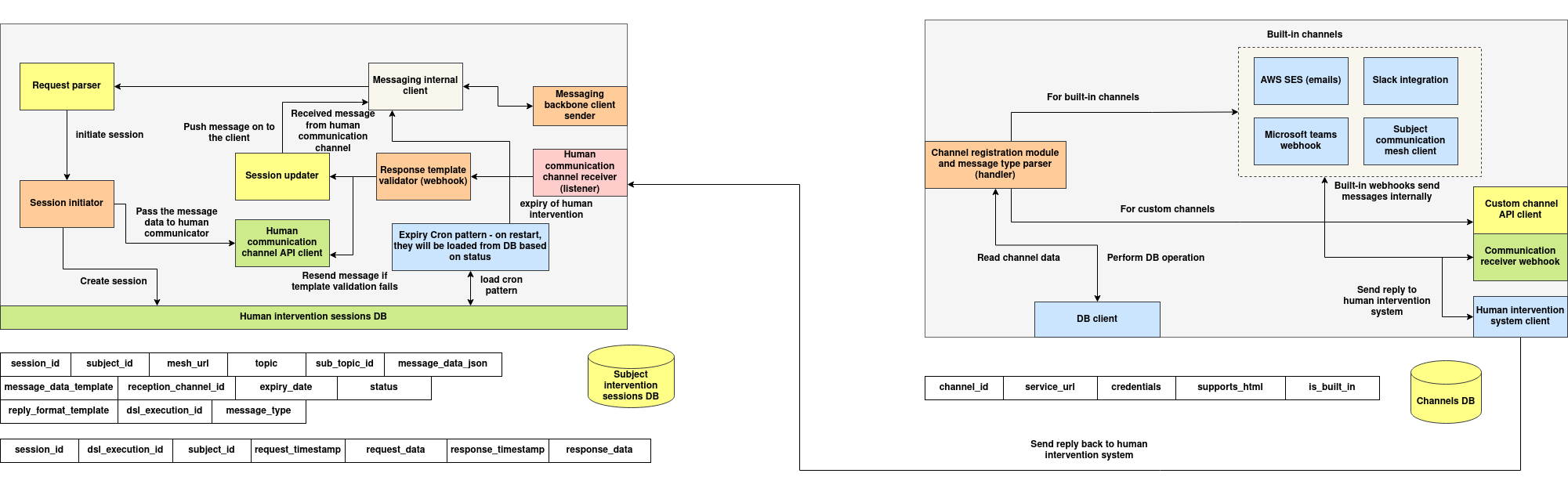
Autonomous agents still need people at critical points: to approve a risky action, supply information the agent cannot find, or correct a result before it is used. Human-in-the-loop means the agent pauses at a decision point and waits for a person. An interrupt means a person, or another system, can stop or redirect an agent while it is working.
This page shows how to do both from agent code. The building block is the Human Intervention Service (HIS): the agent posts a request, a person answers it through any interface built on the HIS API, and the agent picks up the answer.
How It Works
 Agent (on_data)                  Human Intervention Service              Reviewer UI / tool
      │  submit(input_data) ───────────►  record: status = pending   ───────►  lists pending requests
      │                                                                          │
      │  wait / poll  ◄──────────────────  record: status = completed ◄──────── set-response(response_data)
      ▼
 continue with response_data
Each request is a subject response record:
| Field | Description |
|---|---|
id |
Request ID |
subject_id |
The agent that asked (taken from SUBJECT_ID) |
input_data |
What the agent is asking: question, options, context, the draft to approve |
response_data |
The person's answer |
status |
pending until answered, then completed |
creation_time, response_time |
Unix timestamps |
Asking a Human from an Agent
The agents SDK includes HisClient (core/his.py):
from core.his import HisClient

his = HisClient(
    base_url="http://<his-host>:30608",
    poll_interval=1.0,     # seconds between checks
    max_wait=300,          # default timeout for submit_and_wait, in seconds
)
Blocking: Wait for the Answer
def on_data(self, task):
    draft = self.write_contract_summary(task.job_data)

    reply = his.submit_and_wait(
        input_data={
            "kind": "approval",
            "question": "Approve this summary before it is sent?",
            "draft": draft,
            "options": ["approve", "reject", "edit"],
        },
        wait_timeout=600,        # None → max_wait; a negative value → wait forever
    )

    decision = reply.response_data
    if decision.get("choice") == "reject":
        return AgentResult(task_id=task.task_id, is_error=True,
                           error_data={"stage": "human_review", "message": "rejected"})
    if decision.get("choice") == "edit":
        draft = decision["edited_draft"]
    return AgentResult(task_id=task.task_id, job_output={"summary": draft})
submit_and_wait raises TimeoutError if nobody answers in time. Catch it to escalate, pick a safe default, or fail the task.
Non-Blocking: Ask Now, Check Later
req = his.submit(input_data={"question": "Which region should this deploy to?"})
# ...continue other work, store req.id in the task state...

reply = his.check_and_get_response(req.id)   # None while pending
if reply:
    region = reply.response_data["region"]
Use this when the agent can do useful work while it waits, or when the decision can arrive in a later task.
Answering Requests (Reviewer Side)
Any UI, chat bot or script can act as the reviewer interface through the HIS REST API:
| Method & Path | Description |
|---|---|
POST /subject-responses |
Create a request (used by HisClient.submit) |
GET /subject-responses/<id> |
Get one request |
GET /subject-responses/by-subject/<subject_id> |
All requests from one agent |
POST /subject-responses/query |
Query with a MongoDB filter, e.g. {"status": "pending"} |
POST /subject-responses/<id>/set-response |
Answer: {"response_data": {...}, "status": "COMPLETED"} |
PUT / PATCH /subject-responses/<id> |
Update a request |
DELETE /subject-responses/<id> |
Delete a request |
# List pending requests
curl -s -X POST http://<his-host>:30608/subject-responses/query \
  -H "Content-Type: application/json" -d '{"status": "pending"}'

# Approve one
curl -s -X POST http://<his-host>:30608/subject-responses/<id>/set-response \
  -H "Content-Type: application/json" \
  -d '{"response_data": {"choice": "approve"}}'
Responses use the shape {"ok": <bool>, "data": ..., "error": ...}.
Interrupts
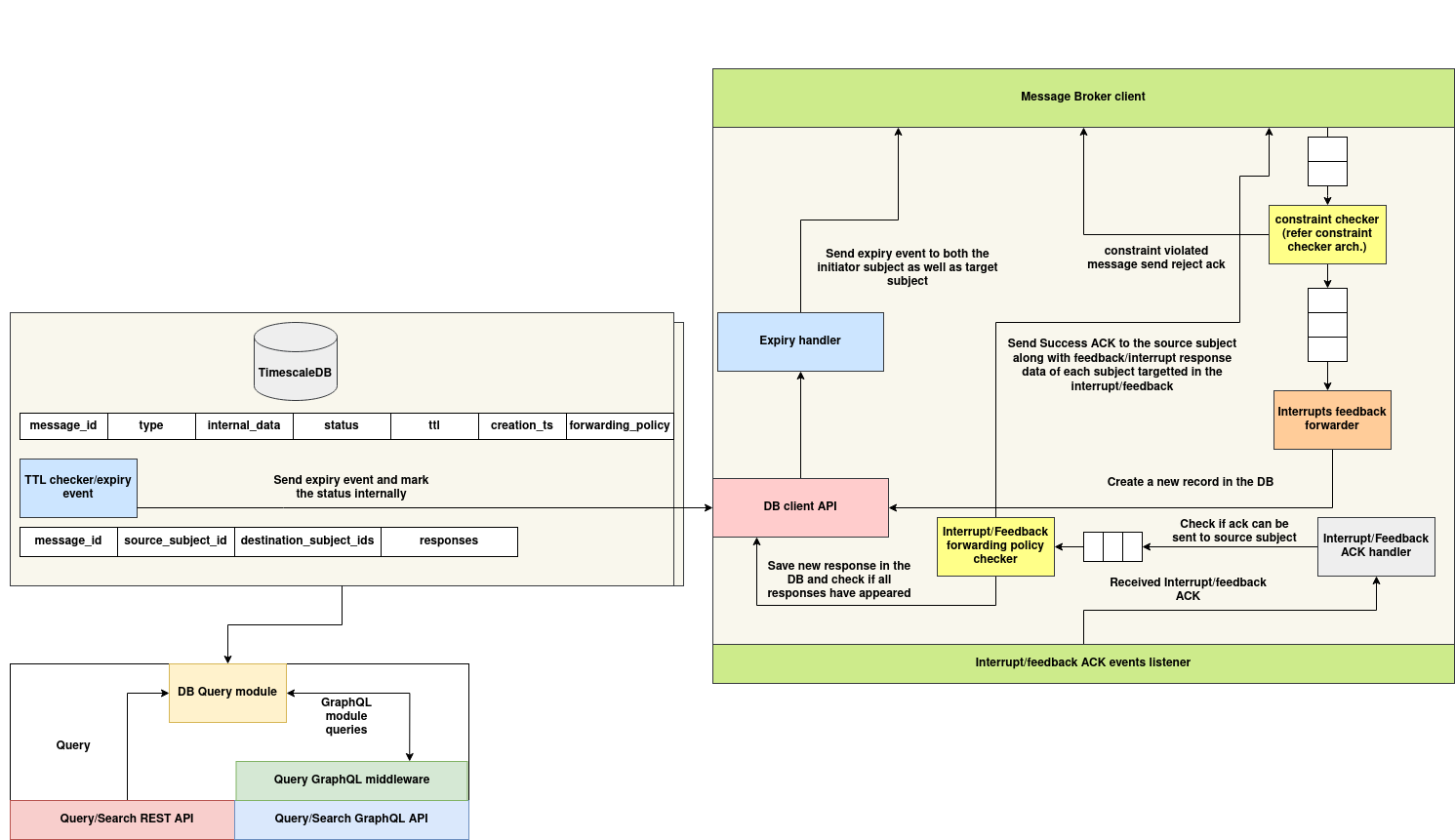
An agent can be stopped or redirected while it runs:
| Interrupt | How |
|---|---|
| Pause before a step | Make the step depend on a human answer with submit_and_wait. The agent cannot continue until someone responds |
| Cancel or redirect at a checkpoint | Between steps of a long task, call check_and_get_response on an open "control" request. A reviewer answers it with, for example, {"action": "stop"} or new instructions, and the agent acts on it at the next check |
| Signal over the mesh | Send a P2P event to the agent, which receives it in on_event(event_name, event_data). Set a flag there that the task loop checks. See Chat and P2P Communication |
| Stop accepting work | Block new tasks with an admission policy, for example a message_prechecker that reads a kill-switch from the Profile Manager. See Agentic Governance |
Other Human-in-the-Loop Points
| Mechanism | Page |
|---|---|
| Human verification of delegated results, with live WebSocket updates | Verification System |
| Human interaction inside DSL workflows | DSL Manager — Human Interaction |
| Human review of lessons before agents use them | Learner |
Deploying the Service
The HIS is installed by deploy_services.sh from src/yaml/human-intervention.yaml in the agent-automation repository, into the registries namespace and exposed on NodePort 30608. See Install & Setup.
Architecture